
NewsNEWCENTER
Featured products
Contact Us
GE DS200IMCPG1CGC Mark V Power Supply Interface Board Installation, Setup and Commissioning Guide
2026-10-30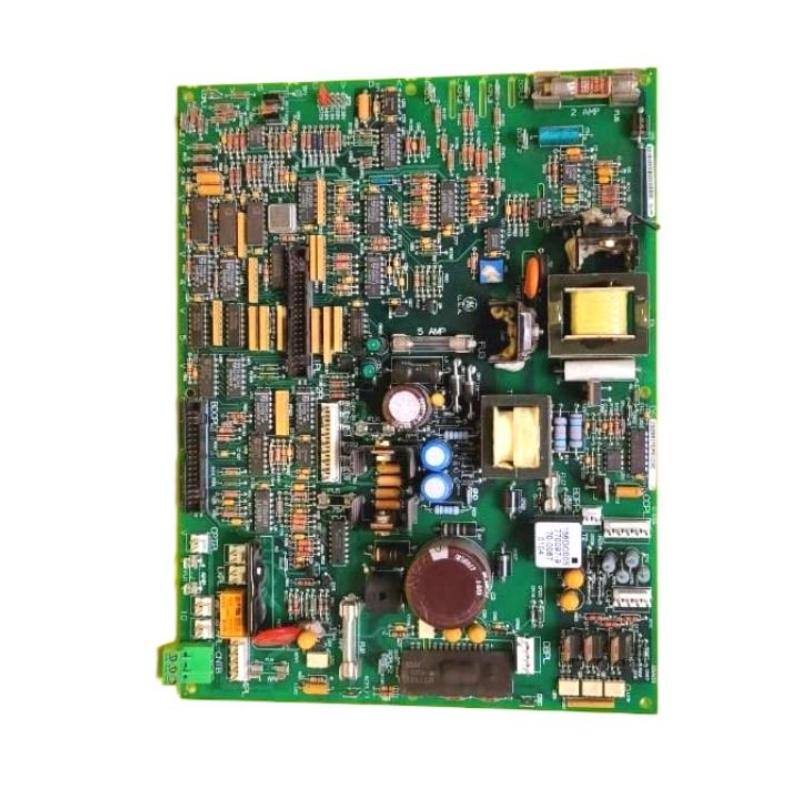
1. Introduction
The GE DS200IMCPG1CGC is a Power Supply Interface Board designed for the GE Mark V Speedtronic control system. It is also identified as an IGBT Power Supply Board and belongs to the IMCP family of Mark V circuit boards. The board is used in the power interface arrangement of compatible Mark V drive-control systems. It connects by cable to the DS200SDCC Drive Control Board through the 1PL connector. This connection makes correct board identification, cable installation, and configuration verification important during maintenance and replacement. The DS200IMCPG1CGC is a revised version within the DS200IMCPG1 family. Its complete suffix identifies a specific hardware and artwork revision combination. Therefore, it should not automatically be treated as interchangeable with other DS200IMCPG1 variants. This guide explains the preparation, installation, connection inspection, configuration verification, commissioning, and maintenance procedures relevant to the GE DS200IMCPG1CGC.
2. Product Overview and Technical Specifications
The DS200IMCPG1CGC is intended for use in compatible GE Mark V turbine and drive-control installations. Its primary role is power-supply interfacing within the associated control hardware.
| Parameter | Description |
|---|---|
| Manufacturer | General Electric (GE) |
| Model Number | DS200IMCPG1CGC |
| Product Series | Mark V DS200 |
| Functional Acronym | IMCP |
| Product Type | Power Supply Interface Board |
| Functional Description | IGBT Power Supply Board |
| Functional Revision | C / G |
| Artwork Revision | C |
| Associated Control Board | DS200SDCC Drive Control Board |
| Documented Cable Interface | 1PL connector on the DS200SDCC |
| Application | Compatible GE Mark V turbine and drive-control systems |
Detailed electrical ratings, connector pin assignments, fuse specifications, and jumper settings must be confirmed using the documentation for the exact DS200IMCPG1CGC revision and host equipment. Specifications from other IMCP variants should not be assumed to apply automatically.
3. Installation Preparation
Correct preparation helps prevent installation errors and unnecessary damage to the replacement board.
3.1 Confirm the complete part number
Before installing the board, compare the replacement unit with the original equipment records. Check the following:
- Confirm that the board label identifies DS200IMCPG1CGC.
- Record the functional and artwork revision markings.
- Check that the replacement is approved for the target Mark V drive assembly.
- Inspect the PCB for cracks, corrosion, damaged components, and signs of overheating.
- Check the connector interfaces for bent pins or mechanical damage.
- Compare the board with the applicable equipment drawings and bill of materials.
A similar model number does not guarantee compatibility. Different suffixes within the DS200IMCPG1 family may represent different revisions or configurations.
3.2 Prepare tools and materials
Prepare suitable maintenance equipment before opening the control cabinet:
- ESD wrist strap and antistatic work surface.
- Appropriate insulated hand tools.
- Approved antistatic packaging for the replacement board.
- Mark V cabinet drawings and maintenance documentation.
- Camera or inspection records for documenting cable positions.
- Approved electrical test instruments, where required.
Keep the work area clean and dry. Avoid placing the PCB on ordinary plastic, metal surfaces, or other materials that may create electrostatic risks.
4. Safety Precautions
The DS200IMCPG1CGC is installed in equipment associated with industrial drive and turbine control. Incorrect handling can affect power interfaces and connected control hardware. Before beginning installation:
- Coordinate the maintenance activity with plant operations and control-system personnel.
- Follow the approved shutdown and maintenance procedures for the host drive or turbine system.
- Apply lockout/tagout procedures where required and verify that hazardous energy has been isolated.
- Allow stored electrical energy to discharge according to the equipment manufacturer’s instructions.
- Never remove or insert the board while energized unless the exact equipment documentation explicitly permits the operation.
- Use ESD protection when handling the circuit board.
- Do not disconnect or reconnect cables without confirming their identity and position.
- Never bypass protective circuits or install an unapproved fuse.
Power-interface equipment may contain hazardous stored energy even after the main supply has been disconnected. Follow the site’s electrical safety procedures before accessing the board.
5. Step-by-Step Installation Procedure
Step 1: Record the original installation
Before removing the existing board, document its location and connection arrangement. Take photographs of the board label, mounting position, cable routing, and connector locations. Pay particular attention to the cable connecting the IMCP board to the DS200SDCC Drive Control Board. Record any visible damage or abnormal conditions. If the original board has failed, do not assume that its previous installation or configuration was necessarily correct.
Step 2: Isolate the equipment
Place the associated equipment in the approved maintenance condition. Complete the required isolation and verification procedures before touching the board or its connectors. Confirm that the relevant power sources have been isolated and that stored energy has been addressed in accordance with the equipment documentation.
Step 3: Remove the existing board
Identify the board mounting hardware and the associated cable connections. Release the cable connection carefully, avoiding excessive force on the connector or PCB. Remove the mounting hardware using appropriate tools and withdraw the board according to the cabinet’s mechanical arrangement. Do not pull on the cable itself when disconnecting it. Inspect the mating connector and cable end for signs of damage.
Step 4: Inspect the replacement board
Place the DS200IMCPG1CGC on an antistatic work surface and inspect it before installation. Check for:
- Cracked or damaged PCB material.
- Burn marks or abnormal discoloration.
- Corrosion or moisture contamination.
- Loose or damaged components.
- Damaged connector contacts.
- Evidence of previous unauthorized repairs.
Confirm the complete model number and revision markings once again before proceeding.
Step 5: Verify the power-interface connections
Inspect the cable and connector arrangement associated with the DS200SDCC Drive Control Board. The DS200IMCPG1CGC is documented as connecting by cable to the 1PL connector on the DS200SDCC. Confirm that the cable is the correct one for the installed drive configuration. Check the cable for:
- Damaged insulation or exposed conductors.
- Loose or bent connector contacts.
- Contamination or corrosion.
- Incorrect routing or mechanical strain.
- Signs of overheating near the connector.
Do not rely on cable appearance alone to determine its function. Verify the connection against the applicable Mark V wiring diagram.
Step 6: Position and secure the board
Align the replacement board with the designated mounting position in the cabinet. Ensure that the board is correctly oriented and that the mounting points line up naturally. Do not force the board into place. Secure the board using the approved mounting hardware and tightening procedure. Avoid excessive mechanical pressure that could damage the PCB.
Step 7: Reconnect the interface cable
After the board has been positioned securely, connect the documented interface cable according to the equipment drawings. Verify that the cable connection corresponds to the 1PL interface on the DS200SDCC Drive Control Board. Check connector alignment and seating. Do not force a connector if resistance is encountered. Stop and inspect for incorrect orientation, bent pins, or an incompatible cable.
Step 8: Complete the physical inspection
Before restoring power, verify:
- The installed board is the correct DS200IMCPG1CGC revision.
- The mounting hardware is secure.
- The interface cable is connected correctly.
- All connectors are properly seated.
- No tools or loose hardware remain inside the cabinet.
- Adjacent boards and wiring have not been disturbed.
- All required maintenance records have been completed.
6. Configuration and System Integration
The DS200IMCPG1CGC operates as part of the broader Mark V drive-control architecture. Its installation must therefore be checked against the complete system configuration rather than treated as an independent power supply replacement.
6.1 Verify revision compatibility
Check the installed board’s functional and artwork revision against the equipment documentation. The DS200IMCPG1CGC should not automatically be substituted with DS200IMCPG1CCA, DS200IMCPG1CFB, DS200IMCPG1CDB, or another member of the IMCP family. Even when the product family is the same, the complete suffix and host equipment configuration must be verified.
6.2 Verify the DS200SDCC connection
Confirm that the cable connection between the IMCP board and the DS200SDCC Drive Control Board follows the approved wiring arrangement. Pay particular attention to the 1PL connector. An incorrect connection or damaged cable may cause interface problems that appear to originate from the power interface board.
6.3 Inspect protective components
Where the applicable board revision includes fuses or other protective components, inspect them according to the correct technical documentation. Do not assume that fuse arrangements or ratings are identical across all DS200IMCPG1 revisions. Replacement components must match the specified type and rating. If a protective component has operated, investigate the underlying electrical fault before restoring the system.
6.4 Review the system configuration
Use the approved Mark V maintenance and diagnostic procedures to check the relevant control-system status. Record any existing alarms before commissioning. Compare the installed board and its connections with the system drawings, previous maintenance records, and approved engineering configuration.
7. Commissioning and Functional Verification
Commissioning confirms that the replacement board has been correctly installed and integrated into the associated drive-control system.
7.1 Initial power restoration
Restore power only after the installation has passed all required inspections and the authorized restoration procedure has been completed. Observe the system for abnormal indications, unexpected alarms, or unusual operating conditions. If a serious fault appears, follow the approved plant procedure rather than repeatedly resetting the equipment.
7.2 Verify the interface connection
Check the status of the associated DS200SDCC Drive Control Board and the relevant interface functions. Review the available diagnostic information and confirm that the board installation has not introduced new connection or power-related faults.
7.3 Verify protective operation
Where protective components are fitted, confirm their condition using the approved inspection procedure. Do not bypass a fuse or other protective device to force the equipment into operation. If a fuse opens again after replacement, investigate the downstream circuit and connected load before further testing.
7.4 Complete system-level verification
The final verification should follow the commissioning requirements for the host drive or turbine system. Check the relevant control-system diagnostics, power-interface condition, and associated drive functions. Only return the equipment to normal service after the responsible engineering and operations personnel have approved the results.
8. Common Installation Problems and Solutions
| Problem | Possible Cause | Recommended Action |
|---|---|---|
| Board does not match the original installation | Incorrect suffix or hardware revision. | Verify the complete part number and system compatibility. |
| Interface cable cannot be connected | Incorrect cable, damaged connector, or misalignment. | Check the cable identification and the 1PL connection arrangement. |
| New board produces a system alarm | Configuration mismatch, connection problem, or hardware fault. | Record diagnostic messages and inspect the complete installation. |
| Protective fuse is open | Abnormal current or a fault in an associated circuit. | Investigate the cause before installing an approved replacement fuse. |
| Intermittent interface operation | Loose cable, damaged connector, or external circuit instability. | Inspect the cable and connected hardware during an approved maintenance window. |
| Visible board damage | Overheating, electrical stress, contamination, or physical impact. | Remove from service according to procedure and arrange specialist evaluation. |
9. Maintenance and Long-Term Reliability
Preventive maintenance helps reduce unexpected failures in legacy Mark V drive-control installations. Recommended maintenance activities include:
- Inspect the board for overheating, corrosion, and physical damage.
- Check the interface cable and connector condition.
- Review recurring power-related alarms.
- Inspect protective components according to the applicable documentation.
- Maintain accurate records of board revisions and replacement history.
- Store spare boards in suitable antistatic packaging.
- Keep cabinet interiors clean and free from moisture and conductive contamination.
- Review the condition of associated drive-control hardware during planned maintenance.
Avoid unnecessary board removal and reinsertion. Repeated handling can increase the risk of connector wear and electrostatic damage.
10. Frequently Asked Questions
What is the GE DS200IMCPG1CGC?
The DS200IMCPG1CGC is a GE Mark V Power Supply Interface Board, also identified as an IGBT Power Supply Board. It belongs to the IMCP family and is used in compatible turbine and drive-control installations.
What is the function of the DS200IMCPG1CGC?
Its role is power-supply interfacing within the associated Mark V drive-control hardware. It forms part of the power interface arrangement connected to the drive-control system.
Which board does the DS200IMCPG1CGC connect to?
It is documented as connecting by cable to the DS200SDCC Drive Control Board through the 1PL connector. The exact cable and connection arrangement should be confirmed against the target equipment drawings.
Is the DS200IMCPG1CGC an IGBT power supply board?
Yes. It is commonly identified as an IGBT Power Supply Board as well as a Power Supply Interface Board within the GE Mark V DS200 product family.
Can the DS200IMCPG1CGC replace other DS200IMCPG1 boards?
Not automatically. Different suffixes can represent different functional or artwork revisions. Verify the complete part number and compatibility with the host drive before substitution.
What should be checked if a fuse opens after installation?
First investigate the associated power circuit, cable connections, connected loads, and possible short circuits. Do not repeatedly replace fuses without identifying the underlying cause, and always use the exact approved fuse specification.
What safety measures are required when installing this board?
Follow the approved shutdown, isolation, and lockout/tagout procedures. Verify that hazardous energy has been addressed, use ESD protection, and avoid handling the board or connectors while energized unless the exact equipment documentation explicitly permits it.
Technical Summary
The GE DS200IMCPG1CGC Mark V Power Supply Interface Board is an IMCP-family circuit board used in compatible turbine and drive-control installations. It is also identified as an IGBT Power Supply Board and has a documented cable connection to the DS200SDCC Drive Control Board through the 1PL connector. Successful installation requires accurate part-number and revision verification, appropriate electrical isolation, ESD protection, careful cable inspection, and correct mechanical mounting. Commissioning should include inspection of the power interface, associated drive-control hardware, and any relevant protective components. For maintenance teams supporting legacy GE Mark V systems, following a controlled installation and verification process helps reduce configuration errors, avoid unnecessary board replacement, and maintain reliable drive-control operation.