
NewsNEWCENTER
Featured products
Contact Us
Allen Bradley 1606-XLS180B Power Supply Troubleshooting Guide
2026-09-23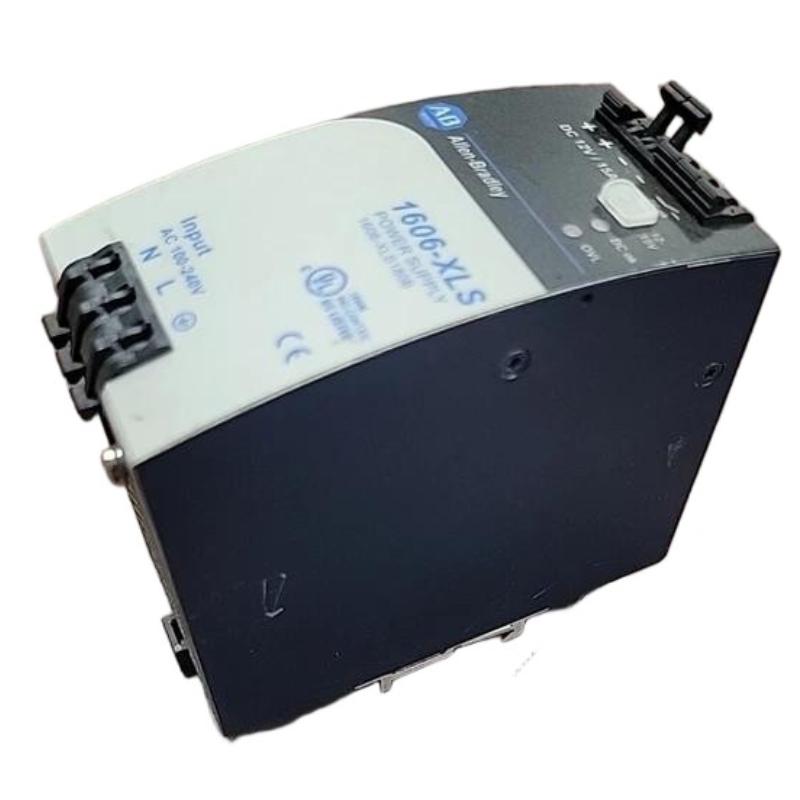
Troubleshooting the Allen Bradley 1606-XLS180B power supply should begin with the complete power path, including the incoming supply, protection devices, power supply, DC distribution wiring, and connected loads. Symptoms such as no output, low voltage, intermittent control resets, overload behavior, or excessive temperature do not automatically indicate an internal power-supply failure.
Allen Bradley 1606-XLS180B Fault Diagnosis Overview
The 1606-XLS180B normally supports multiple downstream automation devices, so a problem in the DC power system can produce several secondary symptoms. A systematic diagnosis should identify where the expected electrical condition is lost.
Incoming Power
      |
      v
Protection
      |
      v
1606-XLS180B
      |
      v
DC Distribution
      |
      v
Automation Loads
Start with the simplest checks and progress toward component-level diagnosis. This approach reduces unnecessary replacement and makes intermittent faults easier to isolate.
Allen Bradley 1606-XLS180B Common Fault Symptoms
- No DC output.
- DC output lower than expected.
- Output changes significantly when the load is connected.
- Downstream PLC or I/O equipment repeatedly resets.
- Control devices lose power intermittently.
- Power supply operates at an unusually high temperature.
- Power supply repeatedly enters a protective condition.
- Faults appear after additional DC loads are added.
Common Causes of Allen Bradley 1606-XLS180B Faults
| Fault Symptom | Possible Cause | Diagnostic Direction |
|---|---|---|
| No DC output | Input supply or wiring problem | Check upstream power and terminals |
| Low output voltage | Excessive load or supply problem | Measure output under different load conditions |
| Output drops when load starts | Overload or downstream fault | Isolate connected circuits |
| Intermittent resets | Loose connection or voltage drop | Measure at the actual load during the fault |
| High operating temperature | Load or ventilation issue | Inspect cabinet thermal conditions |
| Repeated protective shutdown | Short circuit or excessive load | Disconnect downstream branches systematically |
Allen Bradley 1606-XLS180B Troubleshooting Diagnostic Logic
Power Problem
      |
      v
Check Incoming Supply
      |
      +---- Abnormal ----> Correct Upstream Fault
      |
      v
Check Protection and Wiring
      |
      +---- Fault ----> Repair Wiring / Protection
      |
      v
Check 1606-XLS180B Output
      |
      +---- Abnormal ----> Isolate Downstream Loads
      |
      v
Check DC Distribution
      |
      +---- Voltage Drop ----> Repair Distribution Circuit
      |
      v
Check Load Demand
      |
      +---- Excessive ----> Correct Load Condition
      |
      v
Check Temperature
      |
      v
Evaluate Power Supply Hardware
Allen Bradley 1606-XLS180B Testing and Fault Analysis
Input Power Test
Check the incoming power at the appropriate measurement point. If the input is absent or unstable, investigate the upstream disconnect, circuit protection, wiring, and distribution equipment before evaluating the 1606-XLS180B itself.
DC Output Test
Measure the DC output under controlled conditions. A useful diagnostic comparison is to measure the output before and after the downstream loads are enabled.
Test A:
Power supply energized with limited load
        |
        v
Record DC output

Test B:
Normal system load enabled
        |
        v
Record DC output again

Comparison:
Stable voltage -> investigate other fault areas
Voltage falls significantly -> investigate load/distribution/power supply
Any measured value should be compared with the applicable specifications and operating requirements of the installed system rather than judged from a generic expected number.
DC Distribution Test
If the power supply output is normal but the connected controller or I/O equipment sees insufficient voltage, measure the voltage at the load. Inspect terminals, connectors, cable condition, distribution blocks, fuses, and other components between the power supply and the affected equipment.
Load Analysis
A power system that operated correctly before a cabinet expansion may develop problems after additional loads are introduced. Compare the current DC load with the original system design and investigate devices that were recently added or modified.
Thermal Inspection
Check the surrounding cabinet temperature, airflow, mounting position, and nearby heat sources. An overloaded or poorly ventilated power supply may operate differently as cabinet temperature increases.
Allen Bradley 1606-XLS180B Repair and Replacement Procedure
If the evidence indicates an internal power-supply fault, replace the unit using a controlled maintenance procedure.
- Place the machine or process in a safe state.
- Isolate the incoming power according to the approved lockout procedure.
- Verify that hazardous energy has been removed.
- Record the existing wiring and terminal arrangement.
- Remove the 1606-XLS180B after confirming it is safe to handle.
- Inspect the surrounding wiring and mounting area for damage.
- Install the correct replacement unit.
- Reconnect input, output, and grounding conductors correctly.
- Verify terminal tightness and DC polarity.
- Apply power and verify the output.
- Reconnect downstream loads in a controlled sequence.
- Perform a complete functional test.
If the replacement power supply immediately develops the same symptom, stop replacing components and investigate the load, wiring, and upstream electrical conditions.
Allen Bradley 1606-XLS180B Field Troubleshooting Case
Representative example: A control cabinet begins experiencing intermittent controller resets after several additional field devices are connected to the DC distribution circuit.
Observed:
Intermittent controller reset

Step 1:
Check 1606-XLS180B output
Result: Stable under limited load

Step 2:
Enable additional field devices
Result: DC voltage decreases

Step 3:
Disconnect newly added devices
Result: Voltage recovers

Step 4:
Inspect added load and distribution
Result: Further investigation required
This representative case shows why the timing of a fault is valuable diagnostic information. If a power problem begins immediately after additional loads are introduced, the new load and distribution arrangement should be examined before assuming that the original power supply has failed.
Allen Bradley 1606-XLS180B Troubleshooting FAQ
Why is the 1606-XLS180B not providing DC output?
Check the incoming supply, protection devices, wiring, grounding, connected load, and power-supply status. An upstream problem can appear as a power-supply failure.
Why does the output voltage fall when equipment is connected?
Possible causes include excessive load demand, a downstream short circuit, poor distribution wiring, high-resistance terminals, or an issue within the power supply.
Why does a controller reset even though the power supply output appears normal?
The voltage at the power-supply terminals may remain normal while voltage at the controller terminals falls because of distribution losses. Measurements should be taken at the affected load during the fault condition.
What should be checked if the power supply overheats?
Check load demand, cabinet temperature, ventilation, mounting conditions, nearby heat sources, and the overall power-distribution design.
Should I replace the 1606-XLS180B immediately after a fault?
No. First determine whether the problem originates from the incoming supply, wiring, load, distribution circuit, environmental conditions, or the power supply itself.
Allen Bradley 1606-XLS180B Technical Summary
The Allen Bradley 1606-XLS180B power supply should be diagnosed as part of the complete industrial DC power system. A structured troubleshooting process checks input power, protection, wiring, DC output, downstream voltage, load demand, and thermal conditions before concluding that the power supply requires replacement. This method helps maintenance personnel isolate genuine hardware faults while avoiding unnecessary replacement of functional equipment.