
NewsNEWCENTER
Featured products
Contact Us
Allen Bradley 1606-XLP30B Power Supply Troubleshooting Guide
2026-09-22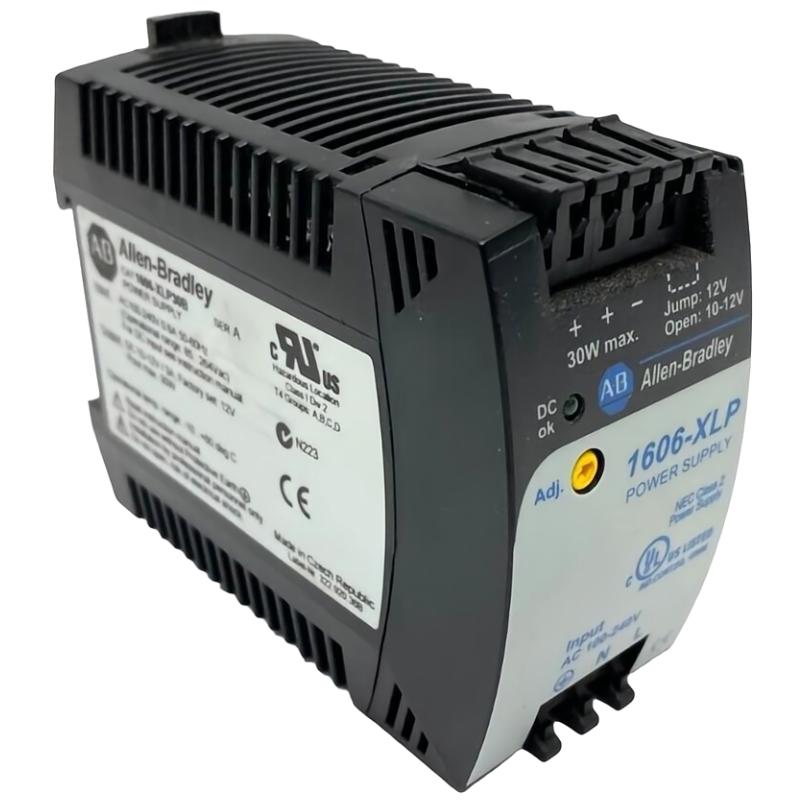
Troubleshooting the Allen Bradley 1606-XLP30B power supply should start with the complete power path rather than assuming the power supply itself has failed. Problems such as no DC output, low voltage, intermittent operation, overload conditions, or overheating can originate from the input supply, wiring, connected load, cabinet temperature, or the power supply itself.
Allen Bradley 1606-XLP30B Fault Diagnosis Overview
The most effective diagnostic method is to divide the power circuit into sections and test each section systematically.
Incoming Power
      |
      v
Protection
      |
      v
1606-XLP30B
      |
      v
DC Distribution
      |
      v
Connected Loads
When a fault occurs, identify where the expected electrical condition disappears. This prevents unnecessary replacement of a functioning power supply.
Allen Bradley 1606-XLP30B Common Fault Symptoms
- No DC output.
- DC output lower than expected.
- DC output fluctuates during operation.
- Power supply shuts down when a load is connected.
- Downstream PLC or I/O modules repeatedly lose power.
- Power supply becomes excessively hot.
- Intermittent control-system resets occur.
- Fault appears after adding additional control loads.
Common Causes of Allen Bradley 1606-XLP30B Faults
| Symptom | Possible Cause | Recommended Check |
|---|---|---|
| No output | Input supply, wiring, protection, or internal fault | Check the complete input path |
| Low DC voltage | Overload or distribution voltage drop | Measure at supply and load |
| Output collapses under load | Excessive load or short circuit | Isolate downstream circuits |
| Intermittent resets | Loose wiring or unstable DC supply | Measure voltage during the fault |
| High temperature | Excessive load or insufficient ventilation | Inspect cabinet conditions and load |
| Repeated shutdown | Overload, short circuit, or internal protection | Disconnect loads systematically |
Allen Bradley 1606-XLP30B Troubleshooting Diagnostic Logic
Power Supply Fault
       |
       v
Check Input Supply
       |
       +---- Abnormal ----> Correct Upstream Supply
       |
       v
Check Wiring and Protection
       |
       +---- Fault ----> Repair Wiring
       |
       v
Check DC Output
       |
       +---- Abnormal ----> Isolate Load
       |
       v
Check Downstream Load
       |
       +---- Excessive / Short ----> Correct Load Circuit
       |
       v
Check Temperature / Ventilation
       |
       v
Evaluate Power Supply Hardware
Allen Bradley 1606-XLP30B Testing and Fault Analysis
Check the Input Supply
Measure the incoming supply at the appropriate point and compare the measured value with the requirements of the installed system. If the input is missing or unstable, investigate upstream protection, disconnects, terminals, and wiring before testing the power supply further.
Check the DC Output
Measure the DC output using an appropriate meter and safe measurement procedure. If the output is normal without a load but falls significantly after the load is connected, investigate the connected circuit for excessive demand, short circuits, or wiring problems.
Check for Voltage Drop
Measure the voltage at the power-supply output and at the downstream equipment.
Measurement A:
1606-XLP30B DC Output = Normal

Measurement B:
Remote Control Load = Lower

Diagnostic Direction:
Check distribution wiring
        |
        +-- Terminal resistance
        +-- Cable condition
        +-- Connector condition
        +-- Excessive cable length
        +-- Additional load
Check the Connected Load
A newly added PLC module, sensor bank, relay group, communication device, or other DC load can increase demand on the power supply. If a fault began after a system expansion, compare the present load with the original cabinet design.
Check Temperature and Ventilation
Excessive cabinet temperature can affect the operating environment of electronic power equipment. Check airflow, cabinet ventilation, nearby heat sources, mounting arrangement, and actual load conditions.
Allen Bradley 1606-XLP30B Repair and Replacement Procedure
If troubleshooting indicates that the power supply itself is defective, replacement should be performed using an approved maintenance procedure.
- Place the controlled equipment into a safe state.
- Isolate and lock out the incoming power according to site procedures.
- Verify that hazardous voltage has been removed.
- Record existing wiring before disconnecting the unit.
- Remove the defective 1606-XLP30B.
- Inspect the mounting location and wiring for heat or mechanical damage.
- Install the correct replacement model.
- Reconnect input, output, and grounding connections according to the applicable documentation.
- Verify polarity and terminal tightness.
- Apply power and check the DC output.
- Reconnect or enable downstream loads progressively.
- Perform a final functional test.
If a replacement unit develops the same fault immediately, investigate the connected load and upstream electrical system instead of repeatedly replacing power supplies.
Allen Bradley 1606-XLP30B Field Troubleshooting Case
Representative example: A control cabinet experiences repeated PLC resets after an additional group of field devices is commissioned. The 1606-XLP30B initially appears to be the source of the problem because the resets disappear when several loads are disconnected.
Observed:
PLC resets after additional loads are enabled

Test 1:
Power supply output without added load = Stable

Test 2:
Output with added load = Voltage decreases

Test 3:
Disconnect added load = Voltage recovers

Diagnostic Conclusion:
Investigate added DC load and distribution circuit
The representative case shows why a power-supply fault should be distinguished from an overload or downstream distribution problem. The correct repair may involve reducing the load, improving the distribution circuit, or redesigning the DC power architecture rather than replacing the power supply.
Allen Bradley 1606-XLP30B Troubleshooting FAQ
Why does the 1606-XLP30B have no DC output?
Possible causes include missing input power, upstream protection problems, incorrect wiring, overload conditions, or an internal power-supply fault. Check the input side first, then isolate the downstream load.
Why does the DC voltage drop when equipment starts?
A significant voltage drop can result from excessive load demand, a short circuit, insufficient distribution wiring, poor terminals, or a problem within the power supply.
Why does a PLC keep restarting even though the power supply is working?
The voltage measured at the power supply may be normal while the voltage at the PLC terminals is lower because of distribution losses or a problem elsewhere in the DC circuit. Measure at the actual load during the restart event.
What causes an industrial power supply to overheat?
Possible causes include excessive loading, inadequate ventilation, high cabinet temperature, nearby heat sources, or an installation condition outside the intended operating environment.
Should the 1606-XLP30B be replaced when a low-voltage fault occurs?
Not before checking the input supply, load current, wiring, terminal condition, distribution voltage drop, temperature, and connected equipment. These checks can distinguish a genuine power-supply problem from an external fault.
Allen Bradley 1606-XLP30B Technical Summary
The Allen Bradley 1606-XLP30B power supply should be troubleshot as part of the complete DC power distribution system. The most useful diagnostic sequence is to verify input power, inspect wiring and grounding, measure DC output, test the downstream load, investigate voltage drop and thermal conditions, and only then evaluate the power-supply hardware. This systematic approach helps reduce unnecessary component replacement and supports reliable maintenance of industrial automation cabinets.