
NewsNEWCENTER
Featured products
Contact Us
Allen-Bradley 1747-M11 Flash Memory Module Troubleshooting and Fault Diagnosis Guide
2026-11-11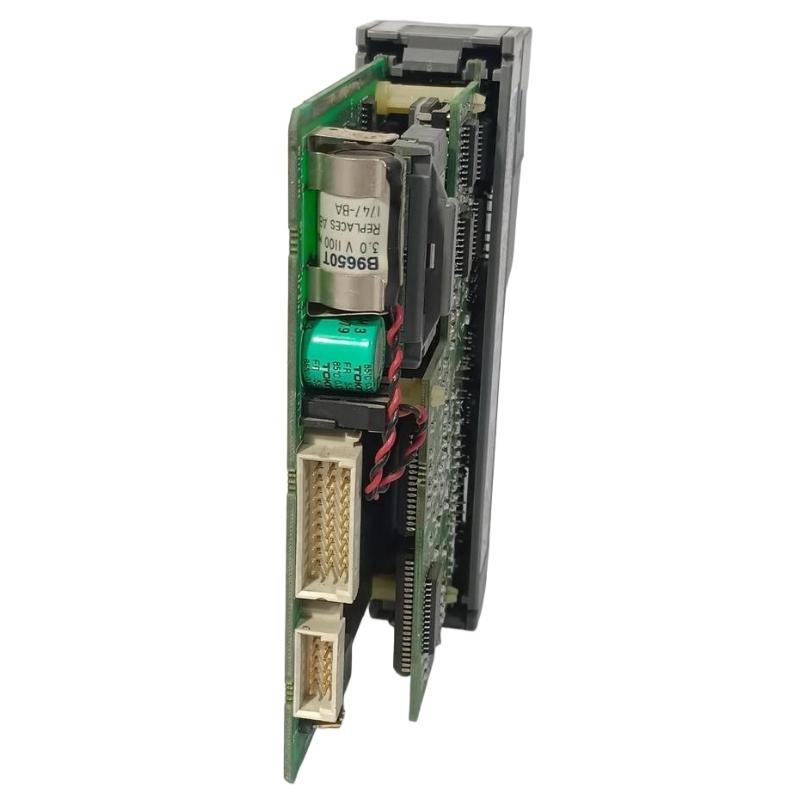
1. Understanding the 1747-M11 Flash Memory Module
The Allen-Bradley 1747-M11 is a flash memory module designed for use with supported Allen-Bradley SLC 500 programmable logic controllers. It provides nonvolatile storage for a user program, allowing the application to be retained independently of the processor’s normal operating memory.
When the module is used for program backup or restoration, compatibility between the 1747-M11 hardware series and the processor operating-system revision is essential. A compatibility mismatch can prevent the processor from recognizing or using the stored program correctly.
This guide covers practical troubleshooting procedures for recognition failures, unsuccessful program transfers, unexpected program behavior, and suspected memory-module faults. Always confirm the exact processor model, operating-system revision, and memory-module series before performing recovery operations.
2. Common Fault Symptoms and Possible Causes
| Observed symptom | Possible cause | Recommended inspection |
|---|---|---|
| Processor does not recognize the module | Incorrect insertion, contact contamination, incompatible processor revision, or damaged module | Check installation, module contacts, processor model, and operating-system revision |
| Program cannot be restored | Invalid stored image, incompatible program configuration, or incorrect restoration procedure | Verify the backup and follow the processor-specific restoration instructions |
| Program transfer or burn operation fails | Incorrect software procedure, communication interruption, or memory-module configuration error | Review processor status, configuration settings, and software messages |
| Processor starts with an unexpected program | Incorrect memory image or unintended restoration operation | Compare the loaded program with the approved offline project |
| Intermittent module recognition | Unstable seating, worn contacts, or mechanical damage | Inspect the module and processor socket under safe conditions |
| Backup appears outdated | The latest application changes were not transferred to the module | Compare program revisions and backup records |
| Processor reports a memory-related fault | Invalid memory contents, processor-side memory issue, or compatibility problem | Record the exact fault indication and isolate the source before recovery |
3. Troubleshooting Module Recognition Problems
If the SLC 500 processor does not recognize the 1747-M11, begin with basic physical and compatibility checks rather than immediately assuming that the module has failed.
- Check the module seating: Confirm that the module is installed in the correct memory-module socket and is fully seated according to the processor installation procedure.
- Inspect the contacts: Look for contamination, corrosion, bent contacts, or visible mechanical damage. Do not scrape or aggressively polish the contact surfaces.
- Confirm the processor model: Identify whether the controller is an SLC 5/03, SLC 5/04, or SLC 5/05 processor.
- Verify the operating-system revision: The supported processor revision depends on the 1747-M11 series.
- Check the module identity: Confirm that the installed device is a 1747-M11 rather than another memory-module model with a similar appearance.
Compatibility is particularly important when replacing an older module with a newer revision or moving a memory module between processors. Do not assume that every 1747-M11 series is supported by every SLC 500 processor.
4. 1747-M11 Series Compatibility Checks
The 1747-M11 Series A and Series B have different processor and operating-system compatibility requirements. Before attempting program restoration, compare the module label with the processor catalog number and operating-system revision.
| Memory-module series | Processor compatibility information |
|---|---|
| 1747-M11 Series A | Supports specified SLC 5/03 OS300 or OS301 processors and SLC 5/04 OS400 processors. Do not assume compatibility with SLC 5/05. |
| 1747-M11 Series B | Supports specified SLC 5/03 OS302 or later processors, SLC 5/04 OS401 or later processors, and compatible SLC 5/05 processors. |
These are compatibility distinctions, not a substitute for checking the exact processor documentation. If the processor revision is below the required level, stop the restoration attempt and confirm an approved hardware or firmware solution before proceeding.
5. Troubleshooting Program Backup and Restoration Failures
A failed backup or restoration operation does not necessarily indicate defective flash memory. The cause may be an incorrect sequence, incompatible program configuration, or an interruption during the transfer process.
Check the source program
- Open the approved offline project and confirm that it belongs to the intended controller.
- Check the project revision and confirm that it represents the latest approved application.
- Verify that the processor model and configuration match the target controller.
- Retain a separate copy of the original offline project before making changes.
Review the memory-module configuration
On applicable SLC 500 processors, memory-module configuration involves processor status-file settings, including the relevant configuration bits in the S:1 status word. Settings such as S:1/10 through S:1/12 must be reviewed according to the processor model and programming procedure.
Do not change these bits randomly to force a transfer. An incorrect configuration can cause unintended program loading or prevent the intended backup behavior.
Repeat the transfer using the approved procedure
- Confirm that the processor and 1747-M11 combination is supported.
- Verify the application in the programming software and preserve the original project.
- Review the memory-module configuration settings.
- Complete the required processor program transfer steps.
- Perform the memory-module programming or burn operation using the supported software procedure.
- Wait for the operation to finish and review any software messages or processor status indications.
- Verify the stored program using the approved method before relying on the module as a backup.
If the operation fails repeatedly, record the exact software error and processor status. Avoid repeated write attempts when the cause of failure has not been identified.
6. Diagnosing Unexpected Program Loading
If the controller starts with a program that differs from the expected application, investigate the memory image and restoration configuration before modifying the live project.
- Compare the running program with the approved offline project.
- Check whether the installed memory module contains an older application revision.
- Review the processor’s memory-module configuration settings.
- Confirm whether a program restoration or automatic loading operation occurred during startup.
- Check project documentation and maintenance records for previous module replacement or backup activity.
Do not overwrite the module or processor memory until the correct application has been identified. In a production environment, an unintended program replacement can affect machine sequencing, interlocks, and process safety.
7. Diagnosing Intermittent Operation and Physical Damage
Intermittent recognition may result from poor seating, damaged contacts, mechanical stress, or a problem with the processor socket. Inspect the module only after following the site’s electrical isolation procedure.
- Look for cracks, deformation, discoloration, or damaged components.
- Check the contact area for oxidation or foreign material.
- Inspect the processor socket for bent or damaged contacts.
- Check whether the module has been exposed to excessive heat, moisture, vibration, or electrostatic discharge.
- Confirm that the module is not being forced into an incorrect socket or adapter.
Do not use solvents or cleaning agents unless they are approved for the specific component and maintenance procedure. If the contact interface or circuit assembly is physically damaged, replacement or qualified bench inspection is generally safer than improvised repair.
8. Understanding the 1747-M15 Programming Adapter
The 1747-M15 is an adapter socket associated with programming the 1747-M11 flash memory device using a compatible commercial PROM programmer. It is not a substitute for the 1747-M11 module and should not be confused with the memory device itself.
If a programming operation involving the adapter fails, check that the correct device type and programming procedure have been selected. Confirm that the programmer supports the specific memory device and that the adapter is installed correctly.
Do not experiment with programmer voltage, timing, or device settings. Incorrect programming conditions can damage the memory device or produce an unreliable backup.
9. When to Suspect a Defective 1747-M11
Consider the module itself a possible failure point when the following conditions have been confirmed:
- The processor model and operating-system revision are compatible with the module series.
- The module is correctly installed and its contacts are in acceptable condition.
- The programming or restoration procedure follows the applicable processor instructions.
- The same error persists after the processor, software, and configuration have been checked.
- The stored image cannot be verified or the module shows visible physical damage.
Where possible, test the module using a known-good compatible processor or an approved programming setup. A comparison test can help distinguish a defective memory module from a processor socket or software issue. Do not use an unverified backup as the basis for production recovery.
10. Replacement and Recovery Recommendations
If the 1747-M11 is confirmed defective, select a replacement based on the processor model, operating-system revision, and required memory-module series. A physically similar module is not necessarily compatible.
- Record the original module catalog number and series before removal.
- Confirm processor compatibility before installing a replacement.
- Use a verified program backup rather than assuming the replacement contains the required application.
- Check the project configuration and memory-module settings before programming.
- Verify the restored application and perform controlled functional checks before returning the machine to normal operation.
- Keep an independent copy of the approved offline project and document the replacement date and revision.
If the processor itself is suspected of having a memory or socket fault, investigate the controller before installing multiple replacement modules. Repeatedly inserting a good module into a damaged socket may create additional problems.
11. Maintenance Practices to Prevent Memory-Module Problems
- Maintain a current offline copy of every approved SLC 500 application.
- Record the processor catalog number, operating-system revision, and installed memory-module series.
- Verify backup contents after programming instead of relying only on a completed transfer message.
- Store spare modules in suitable protective packaging and follow ESD precautions.
- Keep module handling and replacement procedures consistent across maintenance personnel.
- Document software errors, processor faults, and program revision changes.
- Recheck compatibility whenever a processor or memory module is replaced.
12. Technical FAQs
1. What is the main function of the Allen-Bradley 1747-M11?
The 1747-M11 is a flash memory module used to retain a user program in nonvolatile memory for supported SLC 500 processors.
2. Why does my SLC 500 processor fail to recognize the 1747-M11?
Possible causes include incorrect installation, damaged contacts, a processor socket problem, or an incompatible processor operating-system revision. Check the module series and processor compatibility first.
3. Are 1747-M11 Series A and Series B interchangeable?
They should not be treated as universally interchangeable. Their supported SLC 500 processor models and operating-system revisions differ. Verify the exact combination before replacement.
4. Can the 1747-M11 be used with an SLC 5/05 processor?
Series B supports compatible SLC 5/05 processors. Series A should not be assumed to support SLC 5/05. Confirm the exact processor and module revisions.
5. What should I do if a memory-module backup operation fails?
Check processor compatibility, program configuration, relevant status-file settings, and the programming software procedure. Record the error message before repeating the operation.
6. Can an older program stored in the 1747-M11 cause unexpected machine operation?
Yes. Restoring an outdated application may load earlier logic or configuration. Verify the program revision against the approved offline project before restoration.
7. What is the purpose of the 1747-M15?
The 1747-M15 is an adapter socket used with a compatible PROM programmer for programming the memory device. It is not the 1747-M11 memory module itself.
8. Should I clean the 1747-M11 contacts if recognition is intermittent?
Inspect the contacts for contamination or damage. Use only an approved cleaning method and avoid abrasive materials or unapproved chemicals. Follow ESD precautions during handling.
9. Can I use an unverified 1747-M11 as the only backup of a PLC program?
No. Maintain a separate, verified offline project. Confirm that the memory module contains the correct application before relying on it for recovery.
10. When should the 1747-M11 be replaced?
Replacement should be considered when physical damage is present or when repeated testing confirms that the module cannot be recognized, programmed, or verified on a compatible, properly functioning setup.
Technical Summary
The Allen-Bradley 1747-M11 Flash Memory Module provides nonvolatile program storage for supported SLC 500 controllers. Effective troubleshooting requires checking module seating, contact condition, processor compatibility, operating-system revision, program configuration, and the memory programming procedure. The distinction between Series A and Series B is especially important when selecting a replacement or restoring a stored application.
For reliable PLC maintenance, keep a verified offline project, confirm the memory image before restoration, and follow the exact processor-specific instructions. These practices reduce the risk of incompatible memory modules, outdated program recovery, and unexpected controller behavior.