
NewsNEWCENTER
Featured products
Contact Us
GE DS200ADGIH1AAA Troubleshooting Guide: Mark V Auxiliary Interface Board Fault Diagnosis and Maintenance
2026-10-30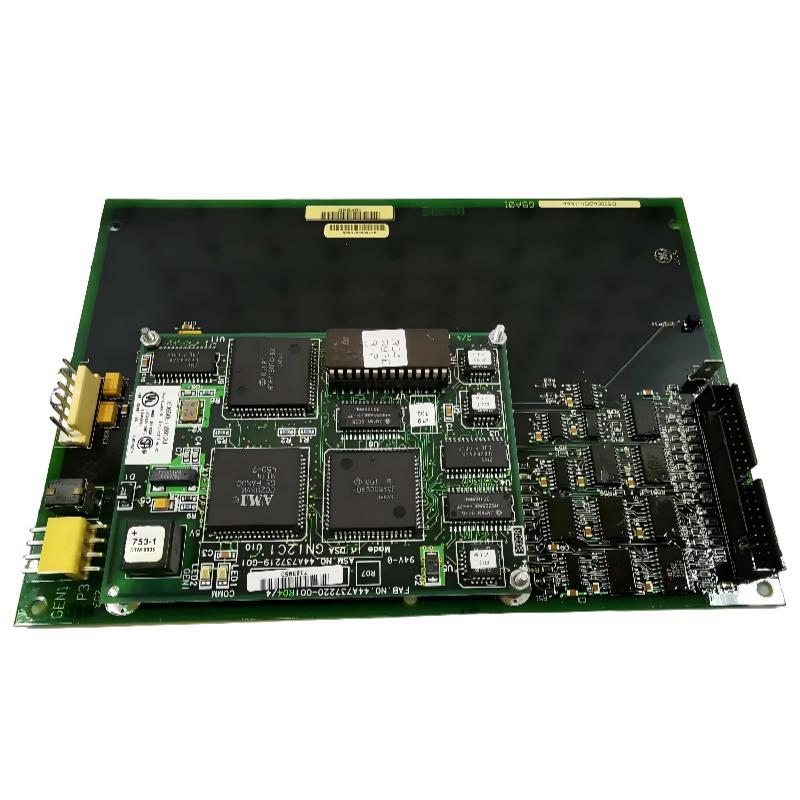
1. Introduction
The GE DS200ADGIH1AAA Auxiliary Interface Board is a printed circuit board designed for use in the GE Mark V Speedtronic turbine control system. It is installed in the control cabinet and forms part of the hardware architecture used in industrial turbine control applications. Like other electronic boards in a turbine control system, the DS200ADGIH1AAA can experience problems associated with electrical connections, component deterioration, configuration errors, environmental conditions, or damage during maintenance. These problems may result in abnormal system indications, intermittent operation, interface faults, or an inability to maintain normal system operation. Effective troubleshooting requires separating board-related problems from faults elsewhere in the control system. A defective connector, incorrect jumper arrangement, damaged cable, or external circuit problem can produce symptoms similar to an internal PCB failure. This guide covers common fault symptoms, inspection procedures, connector and jumper checks, diagnostic methods, repair considerations, and replacement recommendations for the GE DS200ADGIH1AAA.
2. Understanding the Board’s Diagnostic Features
The DS200ADGIH1AAA has several physical features that are relevant to troubleshooting and maintenance.
| Feature | Troubleshooting Relevance |
|---|---|
| 40-pin connector | Inspect for damaged pins, contamination, poor seating, and connection problems. |
| 6-pin connector | Check connector condition and verify the corresponding interface connection. |
| Jumper positions | Incorrect or disturbed jumper settings may affect the intended board configuration. |
| Test points | Allow qualified technicians to perform specified circuit measurements. |
| Mounting positions | Loose mounting or mechanical stress may affect board stability and connections. |
The board is commonly described as having approximately 60 jumpers, multiple test points, one 40-pin connector, and one 6-pin connector. The exact electrical function of individual jumpers and test points must be confirmed using the documentation for the installed revision.
3. Safety Precautions Before Troubleshooting
The DS200ADGIH1AAA is part of a turbine control system. Incorrect troubleshooting procedures may affect equipment operation or create additional faults. Before inspecting the board:
- Coordinate the work with the plant operations and maintenance teams.
- Follow the approved turbine shutdown or maintenance procedure where required.
- Apply lockout/tagout procedures and verify hazardous energy isolation before working on electrical connections.
- Never remove or insert the board while energized unless the exact equipment documentation explicitly permits the operation.
- Use an approved ESD wrist strap and antistatic work surface when handling the PCB.
- Do not change jumper positions without an approved configuration reference.
- Use calibrated test equipment and suitable probes for electrical measurements.
Only qualified personnel familiar with GE Mark V equipment should perform board-level testing or repair.
4. Common DS200ADGIH1AAA Fault Symptoms
4.1 Board-related system alarms
A board-related alarm may indicate that the control system has detected an abnormal condition involving the installed hardware or an associated interface. Possible causes include:
- Incorrect board installation or connector seating.
- Hardware incompatibility or revision differences.
- Damaged connector contacts.
- Incorrect jumper configuration.
- Internal circuit or component failure.
- A fault in an external connected circuit.
Start by recording the complete alarm message and its occurrence time. Review related diagnostic information before removing the board. A general board alarm alone is not sufficient evidence that the PCB has failed.
4.2 Intermittent operation
Intermittent faults may appear and disappear during operation. They can be caused by loose connections, damaged contacts, mechanical stress, unstable external signals, or deteriorating electronic components. Check whether the fault occurs after cabinet maintenance, temperature changes, vibration, or other equipment activity. A clear relationship between the fault and a particular event can help narrow down the source.
4.3 Unexpected interface behavior
If the system reports abnormal interface behavior, investigate the complete connection path rather than focusing only on the DS200ADGIH1AAA. Inspect the board connectors, associated wiring, rack interfaces, and connected equipment. Compare the installed configuration with the approved engineering documentation.
4.4 Visible PCB damage
Discoloration, cracked components, damaged tracks, corrosion, or abnormal solder joints may indicate electrical stress, overheating, contamination, or physical damage. A board with visible damage should be removed from service according to the approved maintenance procedure and evaluated by a qualified repair specialist.
5. Step-by-Step Troubleshooting Procedure
Step 1: Record the original fault information
Before changing the system configuration, collect the available diagnostic information. Record:
- Complete board number: DS200ADGIH1AAA.
- Hardware revision and identification markings.
- Exact alarm messages and fault codes.
- Conditions under which the fault occurs.
- Recent maintenance or replacement activities.
- Related system alarms and diagnostic records.
This information helps determine whether the problem is associated with the board, its installation, or another part of the Mark V system.
Step 2: Inspect the board installation
If the maintenance procedure permits physical inspection, verify that the board is installed in the correct cabinet position and secured properly. Check the mounting points for looseness and inspect the surrounding area for dust, moisture, foreign objects, or signs of overheating. Do not apply mechanical force to the board or attempt to correct a suspected connection problem while the system is energized.
Step 3: Inspect the connectors
The 40-pin and 6-pin connectors should be examined for physical damage and contamination. Look for:
- Bent or displaced pins.
- Corrosion or oxidation.
- Dust or foreign material.
- Cracked connector housings.
- Evidence of poor contact or overheating.
- Damage to the corresponding rack or cable connector.
If a connector is damaged, do not force it into position. Determine whether the problem is on the board side or the mating connector side before proceeding.
Step 4: Verify jumper configuration
Jumper configuration is an important part of maintaining the correct board arrangement. If the board has recently been replaced or serviced, compare its jumper positions with the approved configuration drawing and maintenance records. Do not assume that the original board’s jumper positions are correct without verification. Differences in hardware revisions or previous modifications may make direct copying unsuitable. If a jumper is missing, damaged, or incorrectly positioned, confirm the correct configuration before making any adjustment.
Step 5: Check external connections and related circuits
A fault reported in connection with the DS200ADGIH1AAA may originate outside the PCB. Inspect the associated wiring, connected equipment, and relevant rack interfaces. Look for loose connections, damaged insulation, cable deterioration, or signs of electrical disturbance. Where the system documentation identifies specific interface signals, qualified personnel can compare measured conditions with the approved reference values.
Step 6: Perform approved circuit testing
The board includes multiple test points intended to support circuit inspection. However, measurements must be performed only by qualified service personnel. Use calibrated instruments and probes designed for the specified measurement points. Follow the applicable circuit diagrams and testing procedures. Do not apply arbitrary voltage or resistance tests to unidentified points. Incorrect testing can damage sensitive components or create misleading results.
Step 7: Evaluate whether the fault is internal
If the connectors, installation, jumper configuration, and external circuits have been verified but the fault remains, investigate the possibility of internal PCB damage. Potential internal problems include:
- Failed electronic components.
- Damaged printed circuit tracks.
- Defective solder joints.
- Component deterioration caused by heat or age.
- Electrical damage resulting from abnormal operating conditions.
At this stage, specialist testing or replacement may be more appropriate than repeated adjustments to the installed system.
6. Troubleshooting Common Problems
| Fault Symptom | Possible Cause | Recommended Action |
|---|---|---|
| Board-related alarm | Installation, configuration, interface, or internal hardware problem. | Record diagnostic codes and inspect the complete board installation. |
| Intermittent system fault | Loose connector, damaged cable, mechanical stress, or component deterioration. | Inspect the connection path and review the conditions under which the fault occurs. |
| Abnormal interface behavior | Incorrect jumper settings or an external circuit problem. | Verify the approved jumper arrangement and associated wiring. |
| Board not recognized or unavailable | Incorrect installation, hardware incompatibility, or circuit failure. | Check board identification, revision, rack position, and system diagnostics. |
| Visible overheating | Electrical stress, component failure, or environmental problems. | Investigate the cause and arrange qualified board inspection. |
| Damaged connector | Incorrect handling, forced insertion, or mechanical wear. | Inspect both mating interfaces and repair or replace damaged hardware as appropriate. |
| Fault continues after replacement | External wiring, configuration, rack, or system-level problem. | Investigate the complete circuit rather than repeatedly replacing the board. |
7. Repair and Maintenance Recommendations
Repair decisions should be based on the actual condition of the PCB and the availability of suitable technical documentation.
7.1 Connector repair
Damaged connectors can cause intermittent or complete loss of an interface connection. Connector replacement should be performed by technicians with suitable PCB rework equipment and experience with industrial control boards. After repair, inspect the solder joints and verify mechanical stability before returning the board to service.
7.2 Component-level inspection
If internal component damage is suspected, a specialist should inspect the relevant circuit areas using approved diagnostic procedures. Component replacement should use suitable parts and follow appropriate soldering and inspection standards. Unverified substitutions can introduce additional reliability problems.
7.3 Preventive maintenance
Recommended maintenance activities include:
- Inspect the board and cabinet for dust, moisture, and contamination.
- Check connector condition during approved maintenance intervals.
- Review recurring diagnostic alarms.
- Maintain accurate jumper configuration records.
- Check mounting hardware and mechanical stability.
- Store spare boards in antistatic packaging.
- Record repairs, revisions, and replacement history.
Avoid unnecessary removal and reinsertion of the board. Repeated handling can increase the risk of electrostatic damage and connector wear.
8. Replacement Considerations
If the DS200ADGIH1AAA has an internal hardware fault that cannot be economically or reliably repaired, replacement may be necessary. Before purchasing a replacement, verify the following:
| Verification Item | Reason |
|---|---|
| Complete part number | Confirms that the replacement matches the required board designation. |
| Hardware revision | Revision differences may affect compatibility and configuration. |
| Connector arrangement | Ensures that the physical interfaces match the target installation. |
| Jumper configuration | Helps maintain the required system arrangement. |
| Board condition | Identifies visible damage, corrosion, or previous repair issues. |
| System compatibility | Confirms suitability for the specific GE Mark V cabinet and application. |
The DS200ADGIH1AAA should not be assumed to be interchangeable with a different Mark V board simply because the product descriptions appear similar. Confirm compatibility through the applicable system documentation and engineering review.
9. Frequently Asked Questions
What are the most common causes of DS200ADGIH1AAA problems?
Potential causes include connector damage, incorrect jumper configuration, poor installation, environmental contamination, external circuit faults, and internal electronic component deterioration.
Can incorrect jumper settings cause system faults?
Yes. Incorrect jumper settings may cause the board to operate differently from the intended configuration. Always compare jumper positions with the approved documentation for the installed hardware revision.
How can I identify a defective DS200ADGIH1AAA?
Start by reviewing system alarms and inspecting the board installation, connectors, and configuration. If external causes have been eliminated and the fault remains, qualified personnel can perform circuit-level testing to determine whether the PCB has an internal defect.
Can I test the board using a standard multimeter?
A multimeter may be suitable for specific measurements when the applicable procedure identifies the test points and expected values. It should not be used to perform arbitrary measurements on unidentified circuits. Calibrated equipment and qualified personnel are required.
Should I replace the board immediately when a fault occurs?
Not necessarily. First determine whether the problem is caused by the board, its connectors, jumper configuration, external wiring, or the rack interface. Replacing a functional board will not resolve a fault elsewhere in the system.
Is the DS200ADGIH1AAA compatible with GE Mark VI or Mark VIe?
It is a Mark V board and should not be assumed to be directly compatible with Mark VI or Mark VIe systems. These control platforms have different hardware architectures and require separate compatibility verification.
What information is needed when requesting a replacement?
Provide the complete part number, hardware revision, photographs of the board label and physical condition, and details of the target Mark V installation. This information helps verify the correct replacement configuration.
Technical Summary
The GE DS200ADGIH1AAA Mark V Auxiliary Interface Board is a dedicated circuit board used in GE turbine control installations. Troubleshooting should begin with a review of system alarms, board installation, connector condition, jumper configuration, and associated external circuits. Its 40-pin connector, 6-pin connector, jumper positions, and test points provide important inspection and diagnostic reference points. However, circuit-level measurements and repairs must be performed by qualified personnel using suitable equipment and the correct technical documentation. A systematic troubleshooting process helps distinguish external connection problems from internal board failures, reduces unnecessary replacement, and supports reliable maintenance of legacy GE Mark V turbine control systems.