
NewsNEWCENTER
Featured products
Contact Us
GE DS200ADGIH1AAA Mark V Auxiliary Interface Board Installation, Setup and Commissioning Guide
2026-10-30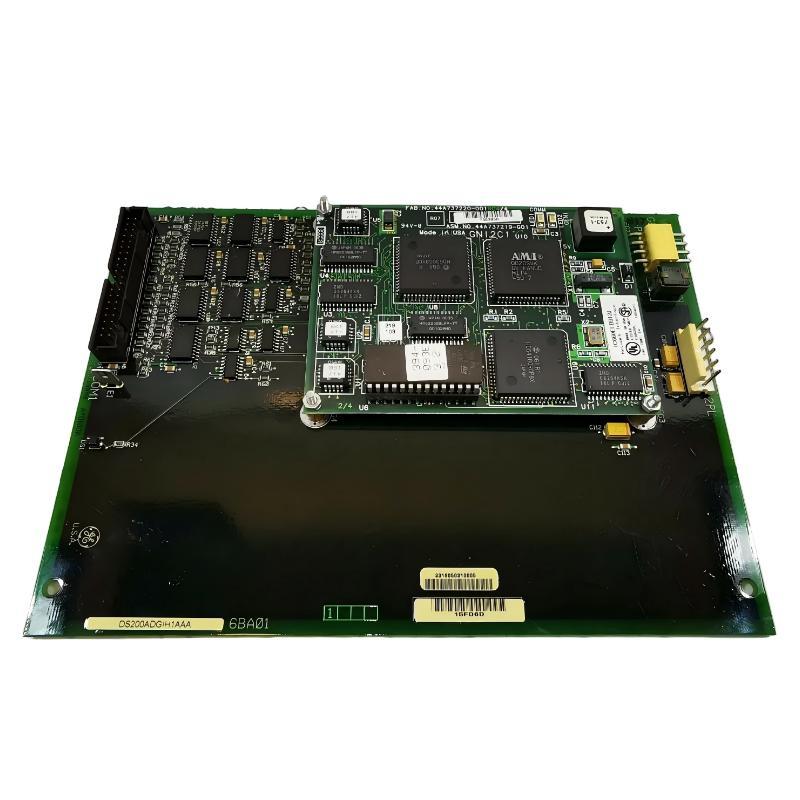
1. Introduction
The GE DS200ADGIH1AAA is an Auxiliary Interface Board designed for the GE Mark V Speedtronic turbine control system. It is used in industrial turbine control installations where auxiliary interface functions and connections between control-system components are required. The Mark V platform is widely associated with gas turbine and steam turbine control applications. Its architecture relies on dedicated printed circuit boards to support signal interfaces, control functions, monitoring, and communication between different parts of the system. The DS200ADGIH1AAA forms part of this hardware environment and must be installed with the correct rack arrangement, connector connections, and board configuration. The board features a 40-pin connector, a 6-pin connector, approximately 60 configurable jumpers, and multiple circuit test points. These physical features are important during installation, inspection, commissioning, and maintenance. Its mounting arrangement includes four screw positions for securing the board in the designated cabinet or rack location. Correct installation is essential for maintaining reliable connections and avoiding problems caused by incorrect board positioning, connector misalignment, electrostatic discharge, or unsuitable jumper settings. This guide explains the installation preparation, mounting procedure, configuration checks, commissioning process, and maintenance recommendations for the GE DS200ADGIH1AAA.
2. Technical Specifications
| Parameter | Description |
|---|---|
| Manufacturer | General Electric (GE) |
| Model Number | DS200ADGIH1AAA |
| Product Type | Auxiliary Interface Board |
| Product Series | Mark V Speedtronic |
| Board Width | Approximately 8 inches |
| Board Length | Approximately 6 inches |
| Main Connector | One 40-pin connector |
| Auxiliary Connector | One 6-pin connector |
| Jumper Configuration | Approximately 60 jumpers |
| Diagnostic Features | Multiple circuit test points |
| Mounting Arrangement | Four screw mounting positions |
| Application | GE Mark V turbine control systems |
The specifications above identify the commonly documented physical characteristics of the DS200ADGIH1AAA. Electrical ratings, connector pin assignments, jumper functions, and detailed operating parameters should be verified against the documentation for the exact board revision and installation.
3. Installation Preparation
Before installing the DS200ADGIH1AAA, maintenance personnel should confirm that the replacement board is suitable for the intended Mark V system. Matching the complete part number is important because visually similar boards may have different hardware arrangements or functional characteristics.
3.1 Verify the board model and revision
Check the product label and confirm that the board is marked DS200ADGIH1AAA. Record the available revision information, serial number, and condition before installation. The following checks are recommended:
- Confirm the complete DS200ADGIH1AAA catalog number.
- Inspect the PCB for cracks, damaged components, corrosion, or signs of overheating.
- Check the 40-pin and 6-pin connectors for bent, damaged, or contaminated contacts.
- Inspect the jumper positions and compare them with the approved configuration record.
- Confirm that the replacement board is approved for the target Mark V assembly.
Do not assume that two boards are interchangeable simply because their external appearance is similar.
3.2 Prepare the installation environment
The DS200ADGIH1AAA is an electronic circuit board and must be handled with appropriate electrostatic-discharge precautions. Prepare the following equipment:
- Approved ESD wrist strap and grounded work surface.
- Suitable insulated hand tools.
- Approved board storage or antistatic packaging.
- Installation drawings and applicable Mark V maintenance documentation.
- Jumper-position records or photographs of the original board.
- Required personal protective equipment.
The control cabinet should be maintained in a clean, dry environment. Dust, moisture, conductive particles, and excessive vibration can affect electronic board reliability.
4. Safety Precautions Before Installation
The DS200ADGIH1AAA may be installed in equipment associated with turbine control and protection. Incorrect installation can affect equipment availability and potentially compromise important control functions. Before beginning work, follow the plant’s approved maintenance procedures.
- Coordinate the maintenance activity with the plant operations team.
- Place the turbine or associated equipment in an approved maintenance condition.
- Apply lockout/tagout procedures where required.
- Verify that all relevant hazardous energy sources have been isolated.
- Never remove or insert the board while energized unless the exact equipment documentation explicitly authorizes that operation.
- Wear an ESD wrist strap when handling the circuit board.
- Avoid touching connector contacts, component pins, and exposed circuit paths.
- Do not change jumper positions without an approved configuration reference.
A turbine control board should never be treated as an ordinary plug-in electronic component. Installation work must be performed by qualified personnel familiar with the Mark V system.
5. Step-by-Step Installation Procedure
Step 1: Inspect the existing board installation
Before removing an existing DS200ADGIH1AAA, examine its mounting position and connector arrangement. Record the board orientation and the position of all relevant connections. Take clear photographs of the installed board, particularly the jumper configuration and connector locations. These records provide a reference during replacement and help prevent configuration errors. If the original board has failed, do not automatically assume that its jumper settings are correct. Compare them with the approved engineering documentation before transferring the configuration.
Step 2: Remove the existing board safely
After the system has been placed in the approved maintenance condition and electrical isolation has been verified, identify the board’s mounting screws and connections. Remove the four mounting screws using suitable tools. Release the connectors carefully and avoid applying excessive force to the PCB or rack receptacles. Keep removed hardware in a clean, organized location. Inspect the rack and connector interfaces for contamination, damaged contacts, or mechanical wear.
Step 3: Inspect the replacement board
Place the replacement DS200ADGIH1AAA on an ESD-protected work surface. Check the PCB for:
- Visible component damage.
- Cracked solder joints or damaged tracks.
- Corrosion or moisture contamination.
- Loose or damaged connectors.
- Incorrect or missing jumpers.
- Signs of previous overheating or unauthorized repair.
Confirm that the board revision is acceptable for the intended system. If the board has been refurbished, review its inspection and test documentation before installation.
Step 4: Verify jumper configuration
The DS200ADGIH1AAA contains approximately 60 jumpers. Their positions can affect the board’s intended configuration, so this step requires particular attention. Before installation:
- Compare the replacement board’s jumper positions with the approved configuration drawing.
- Check the original board photographs and maintenance records.
- Identify any differences between the original and replacement revisions.
- Confirm the correct jumper arrangement with the applicable Mark V documentation.
- Record the final verified jumper configuration.
Do not copy jumper positions blindly from an old board. A previous configuration may have been modified, or a different revision may require a different arrangement.
Step 5: Position the board in the designated mounting location
Align the DS200ADGIH1AAA with its designated rack or cabinet mounting position. Make sure the board is correctly oriented before engaging the connector interfaces. The board should align naturally with the mounting points and connector arrangement. Never force the PCB into position. If resistance is encountered, stop and check for misalignment, damaged pins, obstructions, or an incorrect mounting location.
Step 6: Connect the interface connectors
The board includes one 40-pin connector and one 6-pin connector. Inspect both connector interfaces before mating them. Ensure that the connector positions match the approved system wiring and installation drawings. Important considerations include:
- Confirm the correct connector orientation.
- Check that no pins are bent or obstructed.
- Ensure that connectors are fully and evenly seated.
- Avoid pulling or twisting the PCB during connection.
- Do not interchange connectors based on physical appearance alone.
The exact signal assignments and connector functions must be confirmed using the appropriate board documentation.
Step 7: Secure the board
Once the board is correctly positioned and connected, install the four mounting screws. Tighten them evenly using the approved mechanical procedure. Avoid excessive tightening, which may damage the PCB or mounting hardware. Confirm that the board is stable and that no cable or connector is under mechanical stress.
Step 8: Complete the installation inspection
Before restoring power, conduct a final inspection. Verify that:
- The correct board model has been installed.
- The mounting screws are secure.
- The 40-pin and 6-pin connectors are correctly seated.
- Jumper positions match the approved configuration.
- No tools or foreign objects remain inside the cabinet.
- Adjacent boards and wiring have not been disturbed.
- All maintenance work has been documented.
6. System Setup and Configuration
After the board has been physically installed, the next stage is verifying its configuration within the Mark V control system. The DS200ADGIH1AAA should be treated as part of the complete turbine control architecture. Its operation depends on the correct board assembly, interface connections, and system-level configuration.
6.1 Confirm hardware compatibility
Check the installed board against the system’s original engineering drawings and bill of materials. Confirm that the complete part number and hardware revision are acceptable. A replacement board should not be selected solely on the basis of a similar product description. Differences in revision or assembly configuration may affect compatibility.
6.2 Verify jumper settings
Jumper settings must be checked against the correct configuration documentation. Record each relevant position before returning the system to service. If the original board is unavailable or its configuration cannot be verified, obtain the approved engineering configuration rather than estimating the required settings.
6.3 Check connector and signal paths
Inspect the connected interface paths and compare them with the Mark V cabinet drawings. Pay particular attention to connector alignment, contact condition, and any wiring that may have been disturbed during maintenance. If the system reports an interface or signal fault after installation, check the complete signal path before replacing additional components.
6.4 Review system diagnostics
Use the approved Mark V diagnostic tools and maintenance procedures to examine the status of the installed hardware. Record any alarms, diagnostic messages, or abnormal indications. Compare the results with the system’s previous operating records where available. Do not clear alarms simply to make the control system appear normal. Identify and correct the underlying condition first.
7. Commissioning and Functional Verification
Commissioning confirms that the installed board is correctly integrated into the turbine control system. The commissioning process should be coordinated with the plant’s operations and engineering teams. Any functional test that could affect turbine operation must be carried out under an approved test plan.
7.1 Initial power-up inspection
After the cabinet has passed the installation inspection and the authorized restoration procedure has been completed, observe the control system during startup. Check for:
- Unexpected board-related alarms.
- Abnormal diagnostic messages.
- Unusual indications from adjacent modules.
- Unexpected changes in system status.
- Evidence of connector or communication problems.
If a serious fault appears, follow the plant’s approved troubleshooting and shutdown procedures.
7.2 Verify interface operation
Confirm that the board is recognized and that the expected interface functions are available according to the system design. Where supported by the applicable documentation, use the designated test points and approved diagnostic equipment to examine circuit conditions. Testing must be performed by qualified personnel using calibrated equipment and suitable probes. Incorrect measurement techniques can damage the PCB or produce misleading results.
7.3 Verify overall system operation
The final commissioning stage should confirm that the Mark V system operates normally with the replacement board installed. Review the relevant diagnostic records, controller status, and associated interface functions. Compare the results with the expected operating condition and approved commissioning criteria. Only return the equipment to normal service after all required checks have been completed and authorized.
8. Applications in Industrial Automation
The GE DS200ADGIH1AAA belongs to the Mark V turbine control hardware family. Its auxiliary interface role makes it relevant to installations where dedicated interface circuitry is part of the turbine control arrangement. Typical industrial environments include:
- Gas turbine power generation: Mark V control installations used in industrial and utility power plants.
- Steam turbine systems: Turbine control cabinets requiring dedicated interface hardware.
- Combined-cycle power plants: Turbine automation systems integrated with broader plant control and monitoring infrastructure.
- Industrial cogeneration: Turbine-based power and heat-generation facilities.
- Oil and gas facilities: Industrial installations using turbine-driven equipment and legacy Mark V control systems.
In these environments, maintaining the correct board configuration and reliable physical connections is important for the overall integrity of the control system.
9. Maintenance and Long-Term Reliability
Preventive maintenance can help identify problems before they cause an unexpected interruption to turbine control operations. Recommended maintenance activities include:
- Inspect the board and cabinet for dust, contamination, and signs of overheating.
- Check connector condition during approved maintenance intervals.
- Inspect mounting hardware for mechanical security.
- Maintain accurate records of jumper configurations.
- Review diagnostic alarms and recurring system faults.
- Use ESD protection whenever the board is handled outside its installed position.
- Store spare boards in suitable antistatic packaging.
- Maintain a record of board revisions, repairs, and replacement history.
Avoid unnecessary removal and reinsertion of the board. Repeated handling can increase the risk of connector wear, electrostatic damage, and mechanical stress.
10. Common Installation Problems and Solutions
| Problem | Possible Cause | Recommended Action |
|---|---|---|
| Board does not fit correctly | Incorrect orientation, mounting position, or board revision. | Verify the complete part number and rack installation drawings. |
| Connector cannot be seated | Misalignment, damaged pins, or obstruction. | Stop installation and inspect the connector interface. |
| System reports a board-related alarm | Configuration mismatch, connection issue, or hardware fault. | Review diagnostic messages and verify the installation. |
| Unexpected signal behavior | Incorrect jumper configuration or interface connection. | Compare the board against the approved configuration record. |
| Intermittent interface problems | Loose connectors, damaged contacts, or an external circuit issue. | Inspect the complete interface path during an approved maintenance window. |
| Visible PCB damage | Overheating, corrosion, electrical stress, or physical impact. | Remove from service according to procedure and arrange qualified evaluation. |
11. Frequently Asked Questions
What is the GE DS200ADGIH1AAA?
The DS200ADGIH1AAA is a GE Mark V Auxiliary Interface Board used in turbine control system installations. It is a dedicated circuit board designed for integration into the Mark V hardware architecture.
Which control system is compatible with the DS200ADGIH1AAA?
The board is associated with the GE Mark V Speedtronic turbine control system. Compatibility should be confirmed against the complete board number, revision, and target cabinet configuration.
How many connectors does the DS200ADGIH1AAA have?
Commonly documented physical features include one 40-pin connector and one 6-pin connector. Their exact signal assignments should be verified using the applicable technical documentation.
How many jumpers are installed on the board?
The DS200ADGIH1AAA is commonly described as having approximately 60 jumpers. Their positions should be configured according to the approved Mark V documentation rather than estimated during installation.
Does the DS200ADGIH1AAA have test points?
Yes. The board includes multiple test points that can support circuit-level inspection and diagnostics. Testing should only be performed by qualified technicians with appropriate calibrated equipment.
What are the dimensions of the DS200ADGIH1AAA?
The commonly documented board dimensions are approximately 8 inches wide and 6 inches long. Confirm the physical dimensions and mounting requirements before planning a replacement.
Can the DS200ADGIH1AAA be installed in a Mark VI or Mark VIe system?
The DS200ADGIH1AAA is a Mark V board and should not be assumed to be compatible with Mark VI or Mark VIe hardware. These platforms use different system architectures and require their own approved interface components.
What should be checked before replacing the DS200ADGIH1AAA?
Confirm the complete part number, revision, connector arrangement, jumper configuration, and compatibility with the target Mark V assembly. Also inspect the original board and record its configuration before removal whenever possible.
Technical Summary
The GE DS200ADGIH1AAA Mark V Auxiliary Interface Board is a dedicated hardware component used in GE turbine control installations. Its commonly documented features include a 40-pin connector, a 6-pin connector, approximately 60 jumpers, multiple diagnostic test points, and four mounting screw positions. Successful installation requires careful preparation, correct board identification, ESD protection, verified jumper settings, and accurate connector alignment. After installation, qualified personnel should complete the approved system checks and commissioning procedures before returning the equipment to normal operation. For industrial facilities maintaining legacy GE Mark V turbine control systems, correct handling and configuration of the DS200ADGIH1AAA are important for reliable maintenance, replacement, and long-term system availability.