

ProductPRODUCT
Featured products
Contact Us
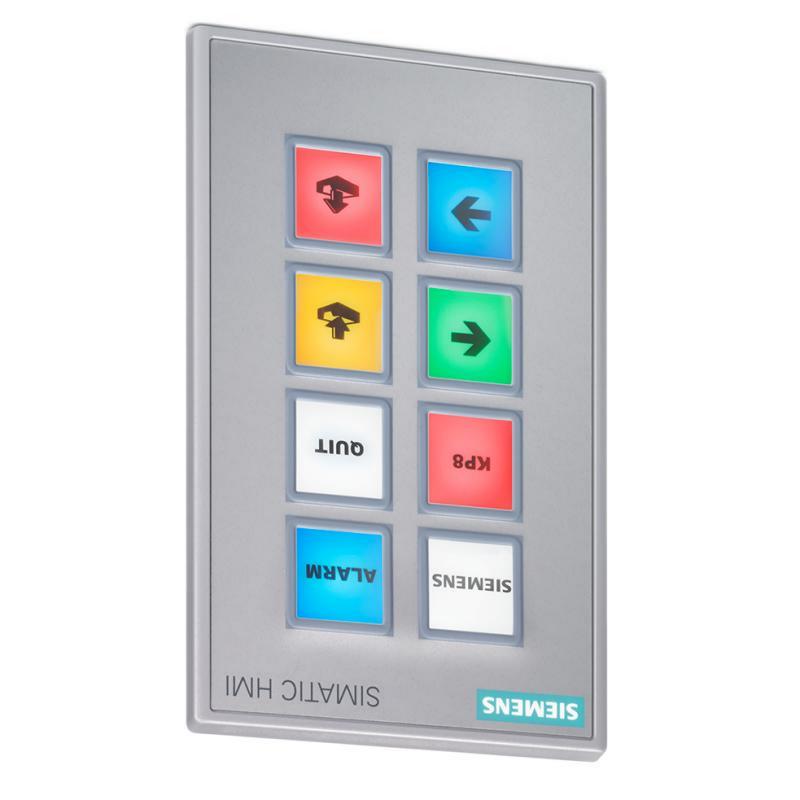
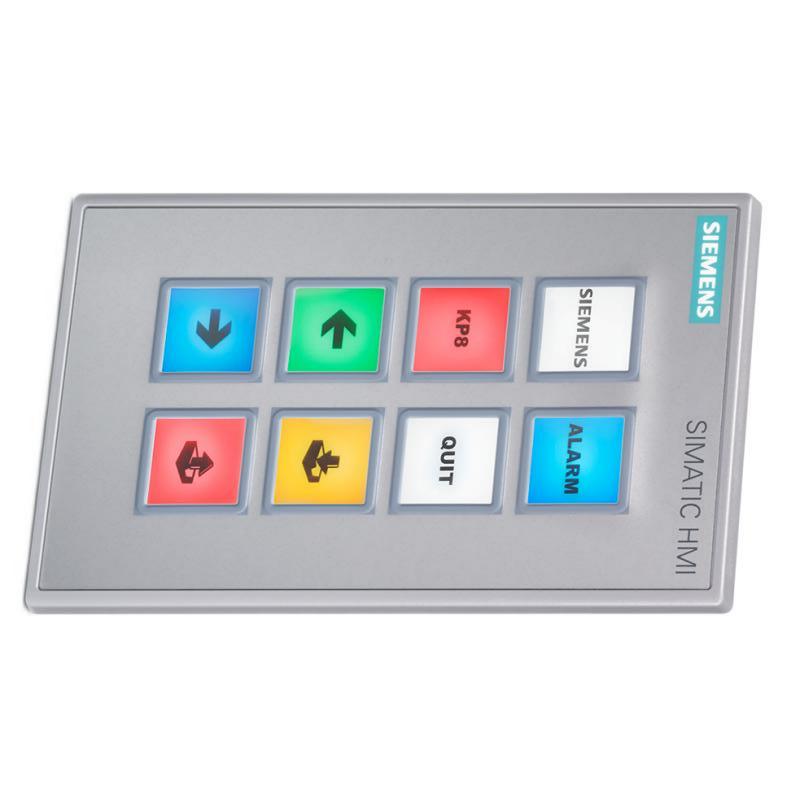
- Siemens
- 6AG1688-3AF37-2AX0
- Keypad Panel
- Germany
- 180 × 105 × 62 mm
- 0.368 kg
- Xiamen, China
- New & In Stock
- T/T, PayPal, Western Union
- 1 Year
- 1-3 Working Days
- DHL, UPS, TNT, FedEx and EMS.
- 24-Hour Service
- COO
- 5
Our advantage

Global Logistics
We have a 10-year logistics and express cooperation agreement, so our products can be shipped to any place in the world.

Brand new and original
Our products are imported in bulk from the place of origin. Because of the cooperative relationship, our products are all original and 100% new.

24-hour service
We provide 7*24 hours service to our customers. We will be there whenever you need us.

Price advantage
All our products are priced very favorably because we have our own warehouse and supply.
| Company Information | |||
| [email protected] | |||
| Mobile | +8615980777398 | ||
| +8615980777398 | |||
| 15980777398 |
Product Overview
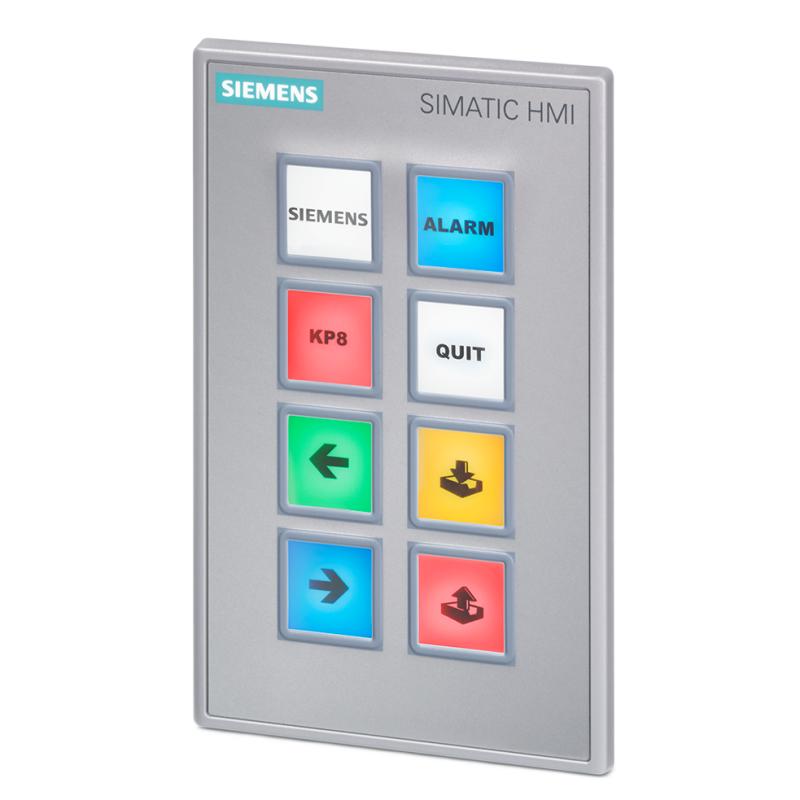
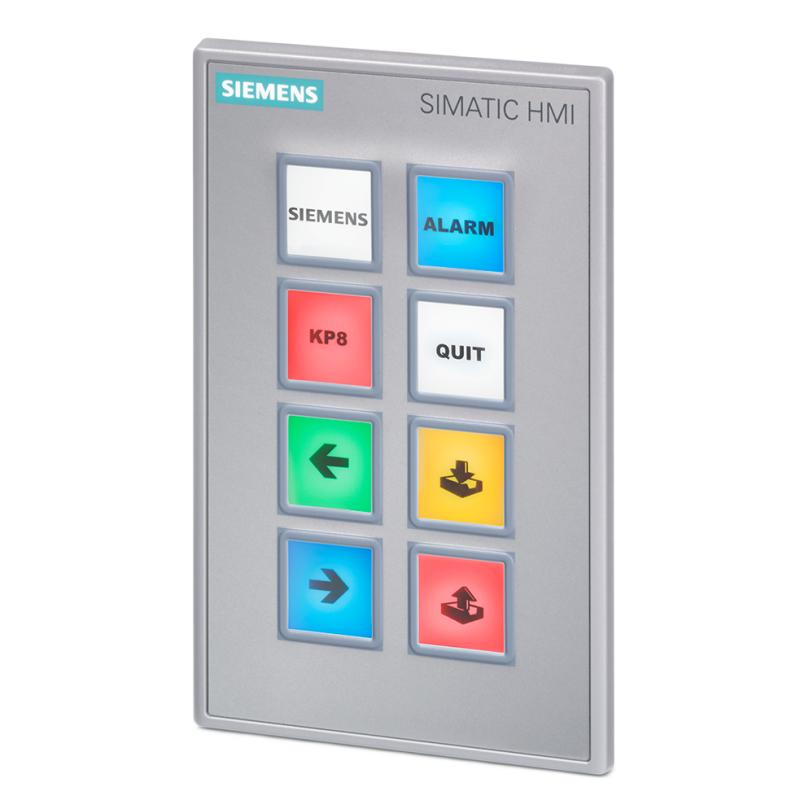
The Siemens 6AG1688-3AF37-2AX0 SIPLUS HMI KP8F PN Key Panel is an industrial operator interface designed for machine control, status indication, and safety-related operator functions. Part of the Siemens SIPLUS HMI product range, this key panel combines configurable push-button operation, multicolor LED indication, PROFINET communication, and PROFIsafe support in a compact front-mounted device.
Unlike a conventional text-entry keypad, the KP8F PN is designed for direct machine operation. Operators can use its short-stroke keys to issue commands, select functions, or interact with control logic. Integrated LED indicators provide visual feedback about machine states, operating modes, or alarms, depending on the application configuration.
The 6AG1688-3AF37-2AX0 is based on the Siemens 6AV3688-3AF37-0AX0 platform and incorporates conformal coating for demanding industrial environments. Its specified operating temperature range is −20 to +55 °C. The device is intended for industrial control applications where a compact operator interface, network connectivity, and safety-related functionality are required.
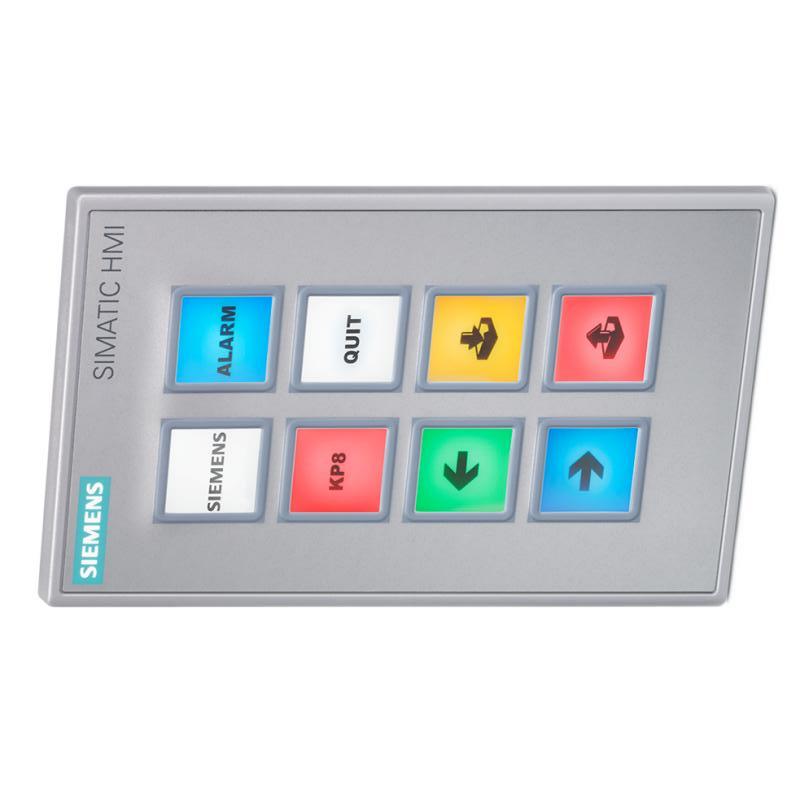
The panel features eight short-stroke keys, eight multicolor LED indicators, and two PROFINET interfaces. It also supports PROFIsafe communication and includes configurable digital I/O functionality. This allows it to be integrated into compatible SIMATIC automation systems, subject to the correct hardware, engineering software, and safety configuration.
For industrial buyers and maintenance engineers, the complete order number is important. Similar-looking Siemens key panels may differ in their safety capabilities, communication interfaces, temperature ratings, and environmental protection. Confirm the exact catalog number before selecting a replacement or designing a new control station.
Technical Specifications
| Parameter | Specification |
|---|---|
| Brand | Siemens |
| Product Family | SIPLUS HMI |
| Model | 6AG1688-3AF37-2AX0 |
| Product Designation | KP8F PN |
| Product Type | Fail-Safe Industrial Key Panel |
| Base Product | 6AV3688-3AF37-0AX0 |
| Operating Supply Voltage | 24 V DC |
| Permitted Supply Voltage | 20.4–28.8 V DC |
| Rated Current Consumption | Approximately 0.3 A |
| Short-Stroke Keys | 8 |
| Function Keys | 8 |
| Multicolor LED Indicators | 8 |
| LED Color Modes | 5: red, green, blue, yellow, and white |
| Digital Inputs | 8 configurable digital I/O functions, subject to configuration |
| Digital Outputs | Up to 8, subject to the supported I/O configuration |
| Communication Interfaces | 2 PROFINET interfaces with integrated switch |
| Safety Communication | PROFIsafe |
| Safety Capability | Supports configured safety applications, subject to system design |
| Front Protection | IP65 |
| Rear Protection | IP20 |
| Conformal Coating | Included |
| Operating Temperature | −20 to +55 °C |
| Mounting Type | Front mounting with mounting clips |
| Dimensions Provided | 180 × 105 × 62 mm |
| Weight Provided | 0.368 kg |
| Typical Application | Industrial machine operation and safety-related operator control |
Note: The product’s safety capability depends on the complete system configuration, approved safety components, engineering software, and application validation. Confirm detailed I/O allocation and safety parameters in the applicable Siemens documentation.
Function and Working Principle
The Siemens 6AG1688-3AF37-2AX0 provides a physical interface between machine operators and an industrial automation system. It converts button presses into digital input signals and displays operating information through its integrated LEDs.
1. Direct Operator Control
The panel includes eight short-stroke keys that can be assigned to machine functions. Depending on the programmed application, these keys may be used for commands such as starting a permitted operation, acknowledging a condition, selecting an operating mode, or initiating a sequence.
The actual meaning of each key is determined by the machine program and the assigned label. Clear labeling and appropriate operator training help prevent incorrect commands.
2. Multicolor LED Status Indication
Eight integrated LEDs provide visual feedback. Each LED supports multiple color modes, including red, green, blue, yellow, and white.
The application can assign colors and operating patterns to machine states. For example, a green indicator may represent an available condition, while a red indicator may be assigned to a fault or stop state. These examples are configuration choices rather than fixed meanings for every installation.
Consistent indicator conventions can make operator stations easier to understand and reduce the time required to identify a machine condition.
3. PROFINET Communication
The KP8F PN provides two PROFINET interfaces with an integrated switch. This supports connection to compatible industrial Ethernet networks and can simplify network arrangements such as line or ring topologies when permitted by the system design.
Through PROFINET, the panel can exchange configured process data with compatible controllers. Correct device configuration, network addressing, controller support, and engineering software are necessary for successful communication.
4. PROFIsafe Support
PROFIsafe is a safety communication protocol used with compatible automation equipment. The KP8F PN can participate in safety-related control applications when integrated with an appropriate safety controller and configured according to the required safety design.
The presence of PROFIsafe support does not make every connected function automatically safety-rated. The complete application must use compatible components, validated logic, and the required safety engineering procedures.
5. Digital I/O Functions
The panel supports configurable digital I/O functionality. These signals can be used by the automation program for operator commands and status-related functions, subject to the supported configuration and safety requirements.
Engineers should distinguish standard process I/O from safety-related signals and verify the permitted allocation of inputs and outputs before commissioning.
Role in Industrial Control Systems
The 6AG1688-3AF37-2AX0 can serve as a compact operator station in a Siemens automation architecture. It is generally used alongside a compatible PLC or fail-safe controller, industrial Ethernet infrastructure, and other field devices.
PLC Integration
A compatible Siemens controller processes operator commands and coordinates machine operation. Depending on the application, the controller may use the panel’s inputs to select operating modes, request a machine sequence, or acknowledge a condition.
For safety-related functions, the selected controller, configuration, and engineering environment must support the required PROFIsafe implementation.
HMI and Operator Interface
The KP8F PN provides physical keys and LEDs rather than a conventional graphical touchscreen. This makes it suitable for applications where direct button operation and clearly visible status indication are preferred.
The panel can complement a larger HMI system. For example, a touchscreen may display process trends and detailed diagnostics, while the KP8F PN provides dedicated machine-level controls.
Industrial Network Integration
The two PROFINET interfaces allow the panel to be connected to a compatible network architecture. An integrated switch can reduce the need for an additional external switch in supported layouts.
Network topology, device naming, IP addressing, and safety communication parameters must be established according to the control-system design.
Safety System Coordination
In applications that require safety-related operator functions, the panel may form part of a system involving a fail-safe PLC, safety sensors, actuators, and validated safety logic.
The engineering team must ensure that each safety function meets the required risk-reduction objectives. Standard PLC logic alone should not be assumed to provide the necessary safety performance.
Industrial Applications
1. Machine Tooling and Manufacturing
Manufacturing machines often require dedicated controls for operator commands, status indication, and operating-mode selection. The KP8F PN can provide these functions in a compact front-mounted panel.
Typical uses include requesting machine cycles, displaying ready or fault states, and providing dedicated operator inputs. The actual configuration depends on the machine’s control program and risk assessment.
2. Packaging and Assembly Equipment
Packaging and assembly lines often use multiple operator stations. A key panel can provide consistent controls for selected operations and clear visual feedback during production.
Its PROFINET interface supports integration with compatible networked controllers, helping coordinate operator actions with the production sequence.
3. Automated Production Lines
Automated lines require clear communication between operators and the control system. The KP8F PN can be used at machine sections, transfer stations, or local control points where a compact interface is beneficial.
The multicolor LEDs can display configured states such as ready, active, waiting, or faulted. These states should be defined consistently throughout the line.
4. Safety-Related Machine Control
The panel’s PROFIsafe support makes it relevant to appropriately engineered safety-related applications. It may be incorporated into a control architecture that uses a compatible fail-safe controller and safety communication.
The exact function of each key and the required safety response must be defined by the system’s risk assessment. Where emergency-stop or other dedicated safety devices are required, the panel must not be treated as a substitute unless the particular function and hardware are explicitly approved for that purpose.
5. Industrial Equipment in Demanding Environments
The SIPLUS version incorporates conformal coating and is specified for operation between −20 and +55 °C. These characteristics can make it useful in industrial environments with conditions that differ from standard indoor control rooms.
However, conformal coating does not eliminate all environmental limitations. The device must still be installed within its specified temperature, mounting, humidity, and enclosure requirements.
Installation and System Integration
Correct installation is important for reliable operator input, network communication, and safety-system performance.
1. Verify the Catalog Number
Before installation, confirm that the product label reads 6AG1688-3AF37-2AX0. Do not assume that a standard KP8 panel or a similar-looking key panel provides the same conformal coating, operating temperature range, or safety capabilities.
Check that the controller and engineering software support the exact device variant.
2. Prepare the Front-Mounting Cutout
The panel is designed for front mounting using mounting clips. The supplied listing dimensions are 180 × 105 × 62 mm, but the manufacturer’s installation drawing should be used to determine the correct mounting cutout.
Leave enough space behind the panel for connectors, wiring bends, access, and maintenance. Confirm that the mounting surface is mechanically suitable and that the panel can be installed without excessive stress.
3. Connect the 24 V DC Supply
Use a suitable 24 V DC power supply within the permitted range of 20.4–28.8 V DC. Check current capacity, polarity, grounding, and any requirements for sharing or looping the supply through the connector.
Isolate power before connecting or disconnecting the device. Follow the manufacturer’s wiring instructions and applicable electrical safety requirements.
4. Configure PROFINET
Assign the correct device name and network parameters in the engineering environment. Confirm that the controller recognizes the panel and that the intended network topology is supported.
Test communication before releasing the equipment for production. Verify that operator commands and LED indications correspond to the intended PLC variables.
5. Configure Standard and Safety Functions
Configure standard I/O and safety-related communication separately according to the system design. Safety-related functions require the correct fail-safe controller, compatible devices, and validated application logic.
Perform the required safety validation and document the results before commissioning. Never rely solely on the presence of a PROFIsafe-capable device to establish that the complete machine is safe.
6. Test Operator Feedback
Test every key, LED, and configured function. Verify that each key produces the intended input and that each indicator displays the correct status.
Where the panel is used in a safety-related application, perform the prescribed validation tests and confirm the expected behavior under fault conditions.
Compatible System Components
The Siemens 6AG1688-3AF37-2AX0 is intended for integration into compatible automation systems. The following components may be relevant depending on the application.
| Component | Function | Integration Considerations |
|---|---|---|
| Siemens fail-safe PLC | Executes standard and safety-related control logic | Must support the required PROFIsafe configuration |
| Siemens SIMATIC PLC | Processes standard operator commands and machine logic | Verify hardware and engineering-software compatibility |
| PROFINET network infrastructure | Connects the panel and controller | Configure device names, network topology, and addressing |
| 24 V DC power supply | Powers the panel | Verify voltage range, current capacity, and wiring |
| Safety sensors | Provide safety-related machine status | Select and configure according to the risk assessment |
| Safety relay or safety controller | Implements required safety functions | Confirm compatibility and required safety performance |
| Contactors or drive systems | Control motors and other actuators | Verify control interfaces and safety-related stopping behavior |
| Industrial HMI | Provides detailed process visualization | Can complement the key panel for diagnostics and operator guidance |
| Mounting panel or enclosure | Supports the front-mounted device | Follow the installation drawing and environmental requirements |
These are potential system components rather than items supplied with the key panel. Actual compatibility depends on the hardware configuration and control-system design.
Alternative Models and Replacement Considerations
When replacing a Siemens key panel, compare the exact product designation and safety capabilities rather than selecting a device based only on physical appearance.
| Alternative or Related Model | Considerations |
|---|---|
| Siemens 6AV3688-3AF37-0AX0 | Standard platform reference for this SIPLUS version; verify environmental and safety differences before substitution |
| Siemens 6AG1688-3AY36-2AX0 SIPLUS HMI KP8 PN | Related key panel, but not the same fail-safe product variant |
| Siemens 6AG1688-3EH47-2AX0 SIPLUS HMI KP32F PN | Larger key-panel variant with a different key count and I/O arrangement |
| Another compatible KP8F PN unit | May be suitable if the full catalog number and hardware configuration match |
| A newer Siemens operator interface | May support an upgrade, but engineering, wiring, and safety validation may be required |
Before selecting a replacement, compare:
- Exact catalog number and product designation.
- Number and type of keys.
- LED count and supported colors.
- PROFINET interface configuration.
- PROFIsafe support and safety-related I/O.
- Supply voltage and current requirements.
- Front and rear protection ratings.
- Operating temperature range and conformal coating.
- Mounting cutout and available installation space.
- Controller compatibility and engineering-software requirements.
A standard key panel should not be assumed to replace a fail-safe panel. Any change affecting safety-related functions must be evaluated and validated by qualified personnel.
Key Advantages
Compact Operator Interface
Eight short-stroke keys and eight multicolor LEDs provide direct control and status indication without requiring a full graphical display.
PROFINET Connectivity
Two PROFINET interfaces support integration with compatible industrial networks and can simplify supported line or ring arrangements.
PROFIsafe Capability
The device can participate in properly engineered safety-related communication with compatible fail-safe controllers and validated application logic.
Environmental Protection
The SIPLUS configuration includes conformal coating and is rated for an operating temperature range of −20 to +55 °C.
Flexible Key and LED Configuration
Keys and indicators can be assigned to application-specific functions, allowing the panel to be adapted to different machine-control tasks.
Integration with Siemens Automation
The panel is designed for use within compatible SIMATIC and PROFINET-based automation architectures, subject to hardware and software requirements.
Technical FAQs
1. What is the Siemens 6AG1688-3AF37-2AX0?
It is a SIPLUS HMI KP8F PN fail-safe key panel used for industrial operator control, status indication, PROFINET communication, and supported PROFIsafe applications.
2. How many keys does this panel have?
It has eight short-stroke keys. The keys can be assigned to machine functions according to the application configuration.
3. How many LED indicators are included?
The panel has eight multicolor LED indicators with five supported color modes: red, green, blue, yellow, and white.
4. What supply voltage does it require?
The rated supply is 24 V DC, with a permitted range of 20.4–28.8 V DC.
5. Does the panel support PROFINET?
Yes. It provides two PROFINET interfaces with an integrated switch for compatible industrial network configurations.
6. What is PROFIsafe used for?
PROFIsafe is a safety communication protocol used by compatible automation devices. The panel can participate in a supported safety-related system when correctly configured with compatible controllers and validated safety logic.
7. Is the panel suitable for harsh industrial environments?
The SIPLUS variant includes conformal coating and has a specified operating temperature range of −20 to +55 °C. Installation must still comply with its environmental and mounting limitations.
8. Can it replace a standard Siemens KP8 panel?
Not automatically. The fail-safe variant includes specific safety and environmental characteristics. Confirm the exact model, communication capabilities, I/O allocation, and safety requirements before substitution.
9. What should be checked before purchasing a replacement?
Verify the complete order number, product condition, connector condition, key operation, LED operation, communication interfaces, and any available test information. Confirm whether the unit meets the requirements of the existing safety application.
10. Can the panel be used without a fail-safe PLC?
Standard operator functions may be possible in a suitable compatible configuration, but PROFIsafe safety functions require an appropriate safety architecture. Consult the product documentation and system design before deciding how to use the device.
Procurement and Maintenance Recommendations
When sourcing the Siemens 6AG1688-3AF37-2AX0, confirm the complete catalog number and the KP8F PN designation. Verify that the required PROFIsafe capability, PROFINET interfaces, conformal coating, and operating temperature range match the installation requirements.
For replacement projects, inspect the front keys, membrane surfaces, LED indicators, connectors, and housing. Where practical, request functional testing of the communication interfaces and relevant I/O before deploying the panel in a production system.
During maintenance, keep the panel clean using methods compatible with its materials and the manufacturer’s instructions. Inspect the mounting clips, connectors, power wiring, and network cabling. Record device configuration and safety-related parameters in the project documentation.
If the panel forms part of a safety-related application, any replacement or configuration change should be followed by the required validation procedures. Verify that the safety functions behave as intended before returning the machine to operation.
Conclusion
The Siemens 6AG1688-3AF37-2AX0 SIPLUS HMI KP8F PN Key Panel is a compact industrial operator interface with eight short-stroke keys, eight multicolor LEDs, dual PROFINET interfaces, and PROFIsafe support. Its 24 V DC supply and conformal-coated design support integration into compatible industrial automation systems operating within its specified environmental limits.
For procurement and maintenance, the most important considerations are the exact catalog number, controller compatibility, communication configuration, mounting dimensions, and safety-system requirements. Careful verification helps ensure that the panel can perform its intended operator-control and status-indication functions reliably.